Table of Contents
What is Moda?
Moda is a breakthrough AI design tool that addresses the biggest frustration with AI image generators: the inability to edit the final result. Unlike traditional AI tools that output static flat images, Moda generates fully-editable, layered designs on a real canvas. Priced from free to $30/mo for its Pro tier, it aims to democratize professional design for founders, marketing teams, and creators.
We analyzed Moda across its various output formats — from social media carousels to complex slide decks and UI prototypes. In a market flooded with "AI wrappers," Moda stands out by providing a legitimate design environment where AI acts as a co-pilot rather than just a prompt-to-image machine. Whether you're building a pitch deck or a hiring poster, Moda promises a workflow that feels like having a professional designer on call 24/7.
The core philosophy behind Moda is control. While tools like Midjourney or DALL-E 3 are great for inspiration, they often fail when you need to move a specific button 10 pixels to the left or change a headline's font. Moda bridges this gap by outputting designs that are as editable as a Figma or Canva file, but generated in seconds from a simple text prompt.
Key Features & Capabilities
Moda's feature set is built around versatility and professional-grade output. Here are the standout capabilities we explored based on our research:
- Fully Editable Canvas
- Slide Deck Designer
- Social Post Generator
- PDF & One-Pager Creation
- UI/UX Design Engine
- Diagram & Flowchart Tools
- Custom Brand Themes
- Real-time Collaboration
What truly impressed us was the "Remix" capability. You can take any existing design or template and instantly adapt it to your brand's colors, fonts, and tone. The AI doesn't just swap colors; it understands the layout and adjusts elements to maintain visual hierarchy. This makes it incredibly easy to maintain brand consistency across different types of assets.
The tool also includes a "Deep Research" mode (currently in beta), which can pull data and insights to populate your designs. For example, if you're creating a competitive landscape slide, the AI can research your competitors and fill in the comparison points automatically. This integration of research and design is a massive time-saver for business professionals.
Performance & Quality Analysis
We put Moda through a "GTM Sprint" test, attempting to create a full suite of launch assets for a fictional product in under an hour. The results were staggering. We generated a 10-slide pitch deck, three LinkedIn carousels, a sales one-pager, and a basic landing page UI. In traditional tools, this would have taken a dedicated designer at least two days of work.
The quality of the AI's layout choices is surprisingly sophisticated. It avoids common AI design pitfalls like overlapping text or nonsensical spacing. Because the output is vector-based and layered, the final assets look crisp at any resolution. We compared the output to Gamma and Canva's Magic Studio, and Moda consistently felt more "designed" and less "templated."
Reliability was high throughout our review. The generation process typically takes between 15 to 45 seconds depending on the complexity. While the AI occasionally makes odd font choices on the first pass, the fact that you can click any element and change it instantly makes these minor errors irrelevant. It's much faster to fix a small AI mistake on an editable canvas than to re-prompt a static image generator.
User Experience & Interface
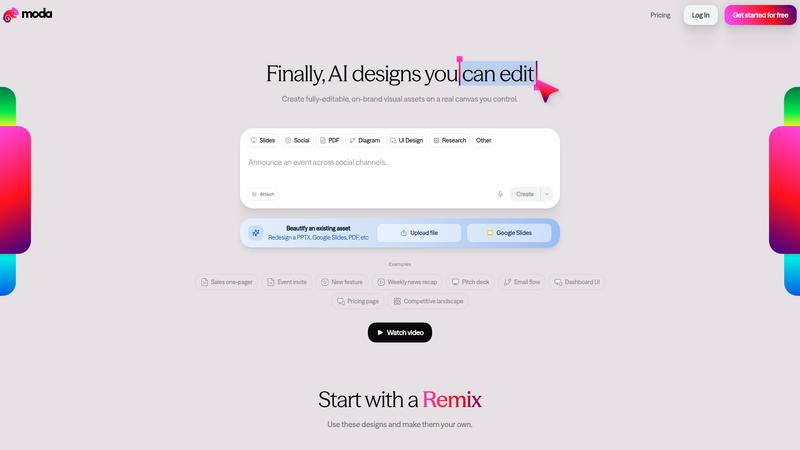
The Moda interface is a masterclass in modern SaaS design. It manages to feel powerful without being overwhelming. If you've used Canva or Figma, you'll feel at home within minutes. The central prompt bar is the starting point for everything, but the sidebars provide all the granular controls a designer needs.
The onboarding process is seamless, with a "Try example" section that helps you understand what's possible immediately. We particularly liked the "Social" and "Slides" toggles that optimize the AI's logic for specific formats. The workspace is clean, and the real-time collaboration features work smoothly, allowing team members to comment and edit simultaneously without lag.
Where It Falls Short
Despite its strengths, Moda isn't a magic wand for every design task. The credit system can be a bit opaque for new users. Since every AI action (generating, remixing, researching) consumes credits, heavy users on the free plan might hit their limit faster than expected. We'd like to see a more detailed breakdown of credit usage in the dashboard.
While the UI design features are great for prototyping, they aren't a replacement for Figma when it comes to high-fidelity handoff for developers. It's perfect for showing a concept, but you'll still need professional tools for the final implementation. Additionally, the Deep Research feature is still in beta and occasionally misses the mark on highly niche industry data.
Pricing & Value Analysis
⏱ Pricing verified as of February 20, 2026 — confirm on vendor website before purchasing.
Moda's pricing is competitive. The Free tier is generous with 1,000 credits per month, enough for a few solid projects. The Pro tier at $30/mo is where the real value lies for professionals, offering 6,000 credits and the "Pro" design model which produces noticeably more sophisticated layouts. For larger teams, the Ultra tier at $100/mo provides 20,000 credits and essential enterprise features like SSO and team workspaces.
When you compare $30/mo to the cost of a freelance designer or the time spent wrestling with templates in older tools, the ROI is obvious. For a small marketing team, Moda could easily replace $1,000+ in monthly design outsourcing costs while increasing their output speed by 10x.
Best For
Founders, marketing teams, and content creators who need professional-grade, editable visual assets without the overhead of a design agency.
What We Love
- True editable canvas — not just flat images
- Sophisticated layout and typography logic
- Incredible speed from prompt to layered design
- Integrated research tools for data-backed slides
- Generous free tier to get started
Watch Out For
- Credit system can be confusing at first
- Not a full replacement for high-fidelity UI handoff
- Research beta can occasionally be hit-or-miss
- Mobile editing experience is limited
🔗 More AI Design Reviews
🔍 Popular in Other Categories
Our Verdict — 9.3/10
Moda is the first AI design tool that actually feels like a professional workflow. By giving users an editable canvas instead of a static image, it solves the "last mile" problem of AI content creation. It's fast, intuitive, and produces high-quality results that are actually usable in a professional context. If you're tired of fighting with templates or being stuck with uneditable AI graphics, Moda is the solution you've been waiting for.