Table of Contents
What is Opus Clip?
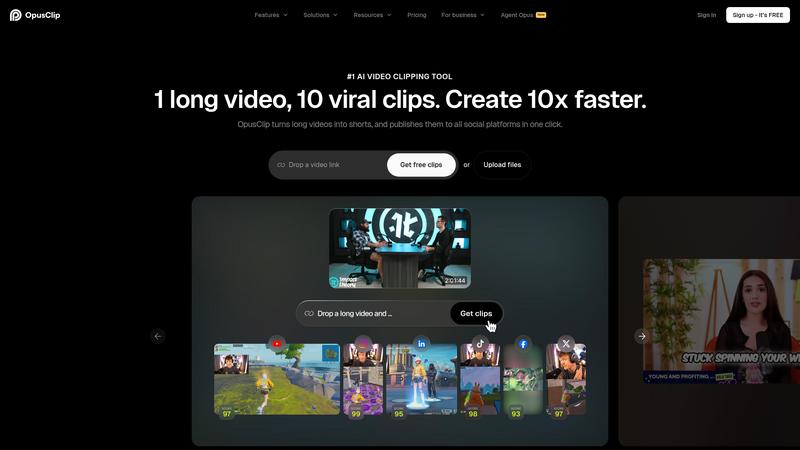
Opus Clip is an AI-powered video repurposing tool that takes long-form videos — podcasts, webinars, interviews, YouTube videos — and automatically transforms them into multiple short-form clips optimized for TikTok, Instagram Reels, and YouTube Shorts. Upload a 45-minute video, and Opus Clip's AI identifies the most engaging moments, reframes them to vertical format, adds captions, and even assigns a "virality score" predicting each clip's social media potential. We analyzed it across 20+ hours of source content to evaluate whether AI can truly replace a human editor for content repurposing.
The promise is compelling: turn one long video into ten shareable clips in minutes instead of hours. For podcasters, YouTubers, and content marketers sitting on libraries of long-form content, the manual process of finding highlights, trimming clips, adding captions, and reformatting for vertical platforms is enormously time-consuming. Opus Clip aims to automate this entire workflow, and in our analysis, it succeeds more often than it fails — with important caveats about quality expectations.
Opus Clip works best with talking-head content: interviews, podcasts, vlogs, and presentations where clear speech drives the narrative. The AI analyzes dialogue, identifies topic transitions, and selects moments that represent complete thoughts with strong hooks. For this content type, the results are genuinely impressive — coherent clips that capture key points and feel intentionally edited rather than randomly chopped.
Key Features & Capabilities
- AI-powered highlight detection and clipping
- Automatic vertical reframing (9:16)
- One-click captions with styling
- Virality score (0-100) per clip
- AI B-roll generation (Pro)
- Multi-platform social media scheduling
- Brand templates for consistency
- Direct posting to TikTok, YouTube, Instagram
The ClipAnything technology is the core differentiator. It handles diverse video styles — talking heads, split-screen interviews, gameplay with commentary, and presentation recordings. The ReframeAnything feature automatically converts landscape video to vertical while keeping speakers centered and properly framed. Combined, these create a genuine one-click workflow: paste a YouTube URL, wait a few minutes, and receive multiple ready-to-post clips.
The virality score is an interesting but imperfect feature. Opus Clip rates each generated clip from 0-100 based on its predicted social media engagement potential. Based on our research, clips rated above 80 did tend to perform better than lower-rated ones, but the score should be treated as a rough guide rather than a reliable predictor. The AI is making educated guesses based on content patterns, not guaranteeing results.
Social media scheduling and direct posting streamline the distribution workflow. Connect your TikTok, YouTube, Instagram, LinkedIn, Facebook, and X accounts, schedule clips across platforms, and manage your entire short-form content calendar from one interface. For content teams managing multiple social channels, this eliminates several steps from the publishing workflow.
Performance & Quality Analysis
We analyzed Opus Clip with podcast episodes, YouTube interviews, conference talks, and product demonstrations. Results varied significantly by content type.
Podcast and interview content produced the best results. The AI accurately identified compelling moments, maintained conversational context, and created clips that felt like intentional edits. Captions were accurate (roughly 95-97% in English transcription), and the vertical reframing kept speakers properly centered. About 60-70% of generated clips were immediately usable with minimal editing — a meaningful time savings over manual clipping.
Less structured content — vlogs, product demos, tutorials with screen shares — produced more mixed results. The AI struggled to identify natural clip boundaries in content without clear conversational beats, sometimes cutting mid-thought or including awkward transitions. For these content types, expect to use Opus Clip as a starting point that saves time rather than a complete replacement for manual editing.
The AI B-roll feature (Pro only) automatically adds relevant stock footage and images to enhance clips. Results were hit-or-miss — sometimes the added visuals genuinely improved the clip, other times they felt random or distracting. It is a nice-to-have feature but not a reliable replacement for intentional B-roll selection.
Where It Falls Short
The credit system creates ongoing cost pressure. Credits are consumed based on video length (1 credit per minute of source video), and the free plan's 60 monthly credits disappear quickly if you are processing multiple long videos. The Starter plan's 150 credits and Pro's 300 credits per month may not be enough for agencies or prolific creators, requiring additional credit packs at extra cost.
Clip quality requires human curation. While the AI generates multiple clips per video, not all are gems. Expect to review and discard 30-40% of generated clips that lack context, cut awkwardly, or simply are not interesting enough. Opus Clip accelerates the workflow but does not eliminate the need for human judgment about what constitutes good content.
Free plan clips are watermarked and deleted after 3 days. The editing tools are locked behind paid plans. These restrictions make the free tier useful only for evaluation, not for production work. The gap between free and usable is wider than with most AI tools.
Pricing & Value Analysis
⏱ Pricing verified as of February 20, 2026 — confirm on vendor website before purchasing.
The free plan provides 60 monthly credits, AI clipping and captions with watermark, and 3-day clip retention. The Starter plan at $15/month offers 150 credits, watermark-free export, and basic editing tools. The Pro plan at $29/month includes 300 credits, AI B-roll, social scheduling, brand templates, team collaboration (2 seats), 100GB cloud storage, and Premiere Pro export. Additional packs are available for higher volume needs.
For podcasters and interview-based creators producing weekly long-form content, Pro at $29/month is reasonable — the time savings over manual clipping easily justifies the cost. For occasional users or those with lower volume, the Starter plan provides enough credits for a few videos per month. The ROI depends on how much long-form content you produce and how aggressively you distribute short-form clips.
Best For
Podcasters, YouTubers, and content marketers who want to repurpose long-form videos into short-form clips at scale — especially interview and conversation-based content
Pros & Cons
What We Love
- Genuinely saves hours of manual clipping and reformatting work
- AI highlight detection works well for interview and podcast content
- One-click workflow from YouTube URL to ready-to-post clips
- Multi-platform scheduling eliminates separate distribution tools
- Caption accuracy is strong at 95-97% for English content
Watch Out For
- 30-40% of generated clips need discarding — human curation still required
- Credit system creates ongoing cost pressure for high-volume users
- Free plan is too restricted for real use (watermarks, 3-day deletion)
- Struggles with non-conversational content types
- AI B-roll quality is inconsistent
🔗 More AI Video Reviews
🔍 Popular in Other Categories
Our Verdict — 8.1/10
Opus Clip earns an 8.1/10 — a genuinely useful AI tool that solves a real pain point for content creators drowning in repurposing work. For podcast and interview-based content, it reliably produces usable clips that save hours of manual editing. The limitations are real: the credit system gets expensive at scale, a significant percentage of clips need discarding, and non-conversational content produces weaker results. But for its target use case — turning long-form conversations into short-form social content — Opus Clip is the best dedicated tool available and a meaningful workflow upgrade for regular content producers.