Table of Contents
What is Coda AI?
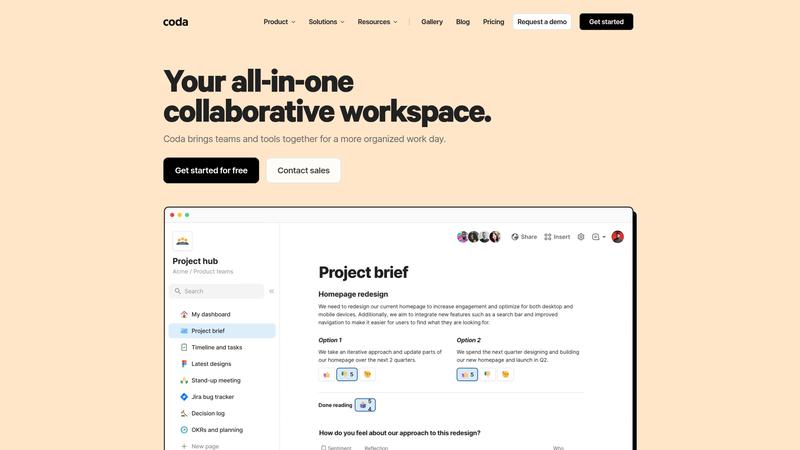
Coda is the doc-meets-database-meets-app platform that has been quietly gaining ground against Notion, Airtable, and Google Docs by doing something none of them do well: building genuinely interactive documents with database-powered tables, buttons, automations, and now AI — all within a single surface. We analyzed Coda AI across project management, content planning, sales tracking, and team documentation.
Unlike Notion AI, which bolts AI writing onto an existing workspace, Coda AI works across your entire doc — querying tables, summarizing data, generating content from database entries, and automating workflows with natural language. Ask "which projects are overdue and who's responsible?" and it pulls answers from your project tracker. Ask it to "draft a status update from this week's completed tasks" and it generates content grounded in your actual data.
Free includes unlimited docs with 50 objects per doc and basic AI. Pro at $10/month per doc maker lifts limits, adds automations, and provides full AI access. For teams wanting documents, data, and AI working together natively, Coda offers a genuinely differentiated approach.
Key Features & Capabilities
- AI assistant that queries and analyzes your doc's data
- Documents with embedded tables, views, and databases
- Packs — 600+ integrations with external tools
- Buttons and automations with no-code logic
- AI content generation grounded in your data
- Cross-doc syncing for connected workspaces
- Publishing — turn docs into shareable web pages
- Templates library with community contributions
Coda AI's data-aware capabilities are the killer feature. In a typical doc with project tables, team tables, and timeline views, the AI references all simultaneously — generating reports from project status and assignments, flagging risks from deadline proximity, drafting client updates from progress entries. This feels meaningfully more useful than generic AI assistants lacking context.
Packs connect 600+ services — Slack, Gmail, GitHub, Jira, Salesforce. Combined with automations: when a row status changes to "approved," post to Slack, create a calendar event, update the Google Sheet. Automations live inside your doc, keeping everything visible.
The doc-as-app paradigm is unique. One doc can be a project tracker, CRM, content calendar, wiki, and automated workflow system. More flexible than Notion, more accessible than Airtable.
Performance & Quality
AI quality is strong with structured data — summaries are accurate, queries return correct results, generated content reflects your actual information. For general writing without data context, it's capable but not differentiated from ChatGPT or Claude.
Performance holds well for docs under 200 tables and 10,000 rows. Beyond that, loading times increase. Enterprise teams with massive datasets may find Airtable more performant.
The learning curve is moderate. More complex than Google Docs and Notion because of formulas, automations, and table relationships. Users comfortable with spreadsheet formulas adapt quickly. The template library helps — starting from a template is dramatically easier than building from scratch.
Where It Falls Short
The learning curve is real. Building from scratch requires understanding tables, views, formulas, buttons, and automations — concepts that take time. Notion's simpler model is more approachable for most teams.
Per-doc-maker pricing means a 20-person team needing edit access pays $200/month — comparable to Notion Team at $8/user but less predictable.
Mobile experience lags behind Notion and Google Docs. Complex docs with tables, buttons, and automations don't translate well to small screens. The app works for viewing but not building.
Pricing & Value
⏱ Pricing verified as of March 2026 — confirm on vendor website.
Free includes unlimited docs with 50 objects/doc, basic AI, and 3 Packs. Pro at $10/month per doc maker adds unlimited objects, full AI, unlimited Packs, cross-doc sync, and version history. Team at $30/month adds admin controls and doc locking. Enterprise is custom with SSO and audit logs.
Free is functional for personal use. The 50-object limit hits faster than expected with interconnected tables. Pro at $10/month is the practical minimum. Per-doc-maker pricing benefits teams with many viewers but few builders.
Best For
Teams wanting one tool combining documents, databases, automations, and AI — especially those outgrowing Notion or finding Airtable too database-centric
Pros & Cons
What We Love
- AI that works across your doc's data — not just generic text generation
- Doc-as-app paradigm: one document can be wiki, tracker, CRM, and workflow
- 600+ integrations via Packs with built-in automations
- More flexible than Notion for interactive, data-driven documents
- Free tier is generous for personal and small team use
Watch Out For
- Steeper learning curve than Notion — blank canvas overwhelms new users
- Per-doc-maker pricing gets expensive for larger teams
- Mobile experience is poor for complex docs with tables and automations
- Performance degrades on very large docs (200+ tables, 10K+ rows)
- Smaller ecosystem and community than Notion or Airtable
🔗 More AI Productivity Reviews
🔍 Popular in Other Categories
Our Verdict — 8.1/10
Coda AI earns an 8.1/10 — the most flexible workspace for teams wanting documents, databases, and AI together natively. Data-aware AI is genuinely differentiated, and the doc-as-app paradigm is powerful once mastered. The learning curve, mobile limitations, and per-doc-maker pricing prevent it from being the default over Notion, but for teams who've outgrown simpler tools, Coda delivers.