Table of Contents
What is VEED.io?
VEED.io is a browser-based video editor that has grown from a simple subtitle tool into a comprehensive AI-powered video platform. With over 4 million users, it targets marketers, educators, podcasters, and small businesses who need professional video without learning Premiere Pro. Everything runs in your browser — no downloads, no installations, no powerful hardware required.
We analyzed VEED across social media creation, podcast repurposing, educational videos, and team collaboration. The platform's strength is accessibility — raw footage to finished, subtitled, branded video in under 10 minutes. AI handles transcription, subtitle styling, background removal, and noise reduction while the visual editor keeps creative control intuitive.
Free exports videos up to 10 minutes with watermark. Lite at $18/month removes watermarks and adds brand kits. Pro at $30/month unlocks full AI tools, 4K export, and priority rendering. For teams producing regular video without a dedicated editor, VEED eliminates the traditional learning curve entirely.
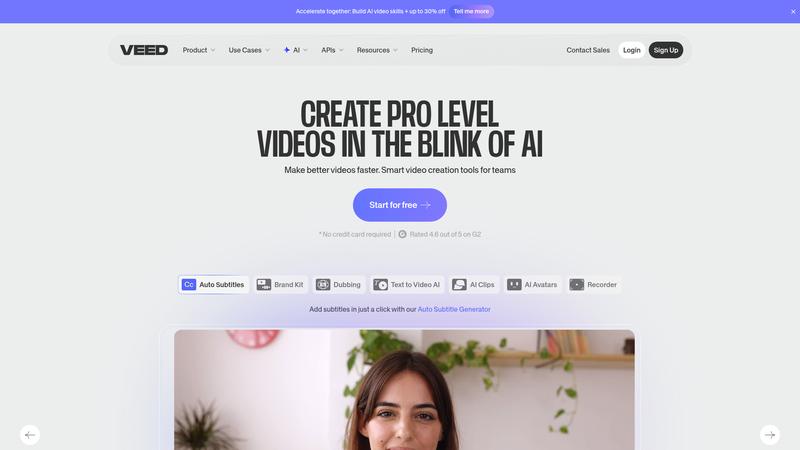
Key Features & Capabilities
- Browser-based editor — no downloads or installation
- AI auto-subtitles in 100+ languages with one click
- AI avatars for faceless video content
- Screen and webcam recording built in
- Magic Cut — AI removes silences and filler words
- Background noise removal with AI
- Brand kit for consistent styling across videos
- Team collaboration with shared workspaces
Auto-subtitles are VEED's flagship and they're excellent. One click produces accurately timed subtitles with trending styles — word-by-word highlighting, animated pop-ins, emoji integration. English accuracy above 95%, timing nearly perfect. This single feature saves hours per video compared to manual subtitling.
Magic Cut analyzes video, identifies silences and filler words, and removes them automatically. A 20-minute raw recording became a tight 14-minute edit that felt natural. About 80% accuracy — a few cuts needed adjustment but the time savings are substantial.
The built-in screen recorder with webcam overlay records and edits in the same browser tab. Record a tutorial, add subtitles, trim dead space, export — without switching tools. Extremely efficient for regular screen-based content.
Performance & Quality
Browser performance was solid on Chrome/Edge with modern hardware. Large files (1GB+, 30+ minutes) caused occasional slowdowns. Typical social media content under 10 minutes was responsive — a 3-minute 1080p video rendered in 2-3 minutes.
AI features work reliably. Subtitles consistently above 95% accuracy for clear English, noise removal improves audio without artifacts, avatars produce usable talking-head videos. None best-in-class individually, but the integration in one browser tab is faster than switching specialized tools.
Team collaboration is practical — shared workspaces, timestamped comments, consistent brand kits. For marketing teams producing regular video, this eliminates the file-sharing bottleneck.
Where It Falls Short
Browser-based means no offline editing, internet dependency for uploads and rendering, and occasional crashes on large projects. Desktop apps like CapCut or DaVinci Resolve are more reliable for long-form or large files.
Advanced editing is thin. Color grading, keyframe animation, complex transitions, and multi-track audio are absent or very basic. Even compared to CapCut desktop, the toolkit feels limited. If your videos need more than cuts, text, and subtitles, you'll hit VEED's ceiling quickly.
Pricing feels restrictive. Lite at $18/month lacks the AI tools that make VEED compelling — you need Pro at $30/month for Magic Cut, avatars, and full exports. The real cost is higher than the headline price.
Pricing & Value
⏱ Pricing verified as of March 2026 — confirm on vendor website.
Free includes 10-minute exports with watermark and basic subtitles. Lite at $18/month removes watermarks, adds brand kit, 25-minute exports. Pro at $30/month unlocks all AI tools, 4K, 2-hour videos, and priority support. Business at $59/month adds teams, unlimited storage, and API. Annual saves ~20%.
Compared to CapCut Pro at $19.99/month, VEED Pro is pricier but has superior subtitles and team features. Compared to Descript at $24/month, VEED is more accessible but less powerful for podcast editing.
Best For
Marketers, educators, and small businesses who need professional video with subtitles quickly — without downloading software or learning complex editing
Pros & Cons
What We Love
- 100% browser-based — no downloads, works on any computer
- Best-in-class auto-subtitles with trending animated styles
- Magic Cut intelligently removes silences and filler words
- Built-in screen recorder with webcam overlay for tutorials
- Team collaboration with shared workspaces and brand kits
Watch Out For
- Browser limitations — no offline editing, crashes on large files
- Advanced editing features are thin compared to desktop editors
- Full AI tools require Pro at $30/mo — Lite tier feels incomplete
- AI avatar quality is usable but noticeably artificial
- Export rendering can be slow during peak hours
🔗 More AI Video Reviews
🔍 Popular in Other Categories
Our Verdict — 8.3/10
VEED.io earns an 8.3/10 — the most accessible video editor available, with AI subtitle tools that save hours per video. The browser-based approach eliminates every barrier: no downloads, no installations, no learning curve. Magic Cut and auto-subtitles handle tedious work. Editing depth is limited versus CapCut or Descript, and real value requires the $30/month Pro tier, but for teams needing polished subtitled video quickly and consistently, VEED is the fastest path from footage to published.