Table of Contents
What is Microsoft Copilot?
Microsoft Copilot is Microsoft's AI assistant, deeply embedded across the Windows and Microsoft 365 ecosystem. Free in its basic form as a chatbot accessible through Bing, Edge, and Windows 11, Copilot becomes genuinely transformative as a paid add-on for Microsoft 365 — where it drafts documents in Word, analyzes data in Excel, creates presentations in PowerPoint, and summarizes email threads in Outlook. With over 430 million Microsoft 365 users and 90% of Fortune 500 companies now using Microsoft 365 Copilot, it is the most widely deployed enterprise AI assistant in the world.
We analyzed Copilot across its free tier, the $20/month Copilot Pro consumer plan, and the $30/user/month Microsoft 365 Copilot business add-on. The experience is split: the free chatbot is competent but unremarkable, while the Microsoft 365 integration genuinely changes how you work with Office documents. If you live in the Microsoft ecosystem, Copilot is the most frictionless way to bring AI into your daily workflow.
Powered by OpenAI's GPT-4 Turbo, Copilot inherits strong reasoning and generation capabilities. But what sets it apart is not the underlying model — it is the integration. Copilot understands your emails, your calendar, your documents, your Teams conversations. It can draft a presentation based on a Word document, summarize a meeting you missed, or pull insights from a spreadsheet without you ever leaving the app you are already working in.
Key Features & Capabilities
Copilot's capabilities vary significantly by tier:
- GPT-4 Turbo powered chatbot (free)
- AI in Word, Excel, PowerPoint, Outlook
- Meeting summarization in Teams
- 100 image generation boosts/day (Pro)
- Copilot Studio for custom agents
- Microsoft Graph integration (enterprise)
- Priority model access (Pro)
- Designer AI image creation
The Word integration is where most users feel the impact first. Ask Copilot to draft a project proposal based on your notes, and it produces a structured document with headings, bullet points, and relevant content. Ask it to rewrite a paragraph in a more formal tone, summarize a 20-page report, or generate a table comparing options you have described. The output is clean and requires less editing than typical AI-generated content because Copilot has context from your organization's documents and communication patterns.
Excel integration is genuinely powerful for data workers. Describe what you want to analyze in plain English — "show me quarterly revenue trends by region" — and Copilot generates formulas, pivot tables, and charts. For people who know what they want from their data but struggle with Excel's formula syntax, this is transformative. It also handles data cleanup tasks that would otherwise require manual work or VBA scripting.
PowerPoint generation from existing content is a standout feature. Point Copilot at a Word document or outline and it creates a complete slide deck with appropriate layouts, formatting, and even suggested images. The results need refinement, but they provide a dramatically better starting point than a blank slide. For the millions of professionals who dread building presentations from scratch, this alone can justify the subscription.
Performance & Quality Analysis
We analyzed Copilot across five scenarios: document drafting, data analysis, presentation creation, email management, and general chatbot use. Performance was strong in the Office integration tier and merely adequate as a standalone chatbot.
Document drafting in Word produced consistently good results. Business communications, reports, and proposals came out well-structured and professionally toned. Copilot's awareness of organizational context — referencing relevant documents in OneDrive and SharePoint — gives it an edge over standalone chatbots that lack this context. Creative writing and more nuanced content still benefit from Claude or ChatGPT, but for professional document creation, Copilot is excellent.
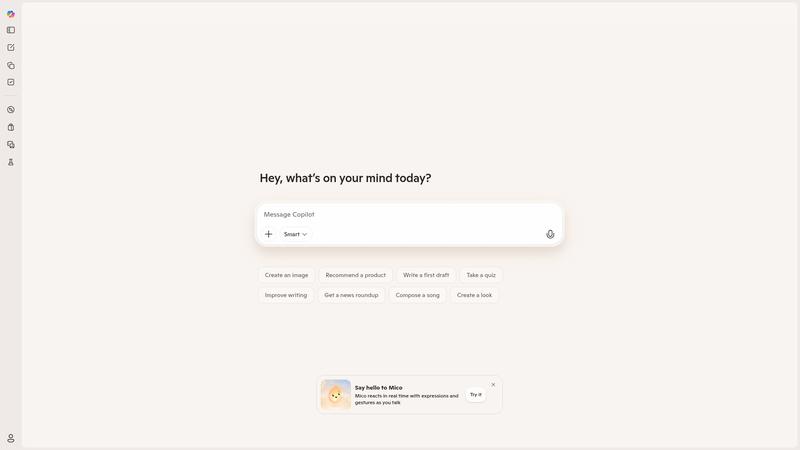
The standalone chatbot experience (free tier) is less impressive. Compared to ChatGPT, Claude, or Gemini, free Copilot feels like a second-tier experience — responses are adequate but rarely surprising, the interface is cluttered with Bing search integration, and the personality is bland. Microsoft is clearly investing more in the enterprise integration than in competing head-to-head as a consumer chatbot.
Teams meeting summarization is a quiet killer feature for enterprise users. Miss a meeting? Copilot provides a structured summary with action items, key decisions, and who said what. For organizations drowning in meetings, this feature alone saves hours per week and ensures nothing falls through the cracks.
Where It Falls Short
The biggest frustration is the pricing and licensing complexity. To get Copilot in your Office apps, you need an existing Microsoft 365 subscription plus the Copilot add-on. For consumers, that means Microsoft 365 Personal ($9.99/mo) plus Copilot Pro ($20/mo) — nearly $30/month total. For businesses, it is $30/user/month on top of your existing Microsoft 365 license. The value is real, but the layered cost structure creates sticker shock and confusion.
The free chatbot tier is underpowered compared to competitors. ChatGPT Free, Gemini Free, and even Grok Free all offer more generous free experiences. Microsoft seems content to let the free Copilot serve as a funnel to paid Microsoft 365 subscriptions rather than competing on the merits of the chatbot itself.
Copilot's hallucination rate in data analysis is a concern. When working with Excel data, it occasionally generates formulas that look correct but produce wrong results, or creates charts that misrepresent the underlying data. For any data work, you need to verify Copilot's output carefully — which somewhat undermines the time-saving promise.
Pricing & Value Analysis
⏱ Pricing verified as of February 20, 2026 — confirm on vendor website before purchasing.
The free tier provides basic chatbot access through Bing, Edge, and Windows. Copilot Pro at $20/month adds priority GPT-4 Turbo access, 100 daily Designer image boosts, and Copilot in Word, Excel, PowerPoint, Outlook, and OneNote (requires a separate Microsoft 365 subscription). Microsoft 365 Copilot for business is $30/user/month as an add-on to eligible Microsoft 365 plans, adding enterprise features including Teams integration, Microsoft Graph, and Copilot Studio.
The value proposition depends entirely on how deeply you use Microsoft 365. If Word, Excel, PowerPoint, and Outlook are your daily tools, the $20-30/month for Copilot integration is easy to justify — it genuinely saves hours per week. If you primarily need a chatbot for general questions and creative tasks, ChatGPT Plus or Claude Pro at $20/month deliver a better standalone experience. Copilot is not the best AI assistant; it is the best AI assistant for Microsoft 365.
Best For
Microsoft 365 power users who want AI seamlessly embedded in Word, Excel, PowerPoint, Outlook, and Teams — especially enterprise teams already invested in the Microsoft ecosystem
Pros & Cons
What We Love
- Deepest Office integration of any AI — drafts, analyzes, and presents inside apps you already use
- Excel data analysis in plain English is genuinely transformative
- Teams meeting summarization saves hours per week
- Enterprise-grade security and compliance built in
- PowerPoint generation from documents is a massive time saver
Watch Out For
- Requires existing Microsoft 365 subscription — layered pricing creates sticker shock
- Free chatbot tier is underpowered vs ChatGPT, Gemini, and Claude
- Occasional hallucinations in Excel formulas and data analysis
- Consumer Copilot Pro feels overpriced at $20/mo without M365 integration
- Licensing complexity is genuinely confusing
🔗 More AI Productivity Reviews
🔍 Popular in Other Categories
Our Verdict — 8.7/10
Microsoft Copilot earns an 8.7/10 — a powerful AI assistant that is best understood as an upgrade to Microsoft 365 rather than a standalone chatbot. The Office integration is unmatched: drafting in Word, analyzing in Excel, presenting in PowerPoint, and summarizing in Teams all work remarkably well. The standalone chatbot experience is less competitive, and the layered pricing is confusing. But for the hundreds of millions of people who live in Microsoft 365 daily, Copilot is the most natural and productive way to bring AI into their existing workflow. If Microsoft is your ecosystem, Copilot is your AI.